
Meet E.L.L.A., your driver’s co-pilot
E.L.L.A. is an agentic AI co-pilot that runs on the managed FleetTab next to your telematics apps. Drivers ask by voice. She answers briefly while the truck moves and asks before she acts.
One voice across the apps in the cab
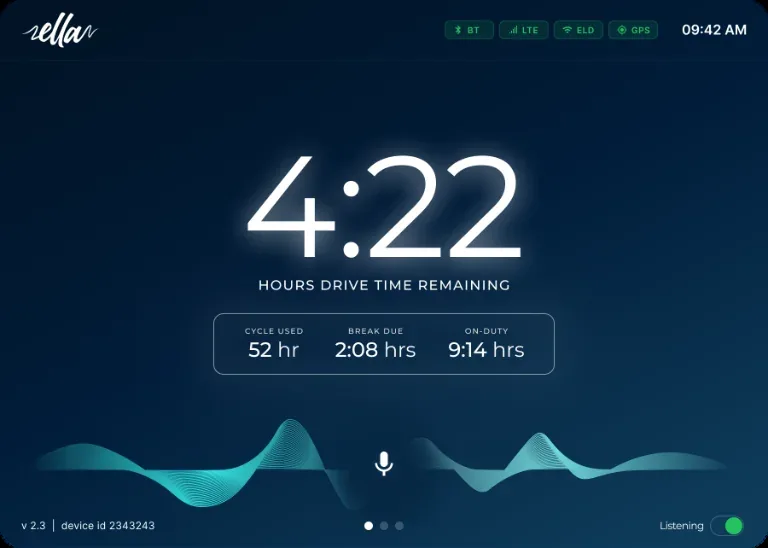
The name stands for Enhanced Large Language Assistant. E.L.L.A. sits at the tablet level and connects across ELD, telematics and fleet applications. Drivers ask in plain language. When the truck moves with no one logged in, she offers to open the ELD login. When drive time runs low, she offers parking. Drivers handle fewer screens while the wheels are turning.
- ELD and Hours of Service
- Vehicle diagnostics and DVIR
- Driver apps and support
- Truck parking data
- In-cab gateway and hardware
- TMS
- Dispatch
“Looks like you’ve got about 45 minutes of drive time left. Want me to find some parking options?”
Practical help through the driver’s day
Five ways E.L.L.A. supports drivers: what starts each one, what she does next, and the screen the driver sees.
-
 Compliance protection
Driver identification alerts
When the truck moves and no one is logged in to the ELD, E.L.L.A. gives the driver a calm, blame-free way to log in before the trip goes on.
TriggerVehicle above 5 MPH for 10+ seconds with no driver logged in to the ELD.
Alerts by voice
A friendly voice alert that assumes the driver forgot, never wrongdoing.
Opens the login
On the driver’s confirmation, she opens the ELD login screen on the tablet.
Knows when to stop
Recognizes yard moves. After 3 prompts she stops and logs the event for the fleet manager.
-
 Regulatory compliance
A clearer start to inspections
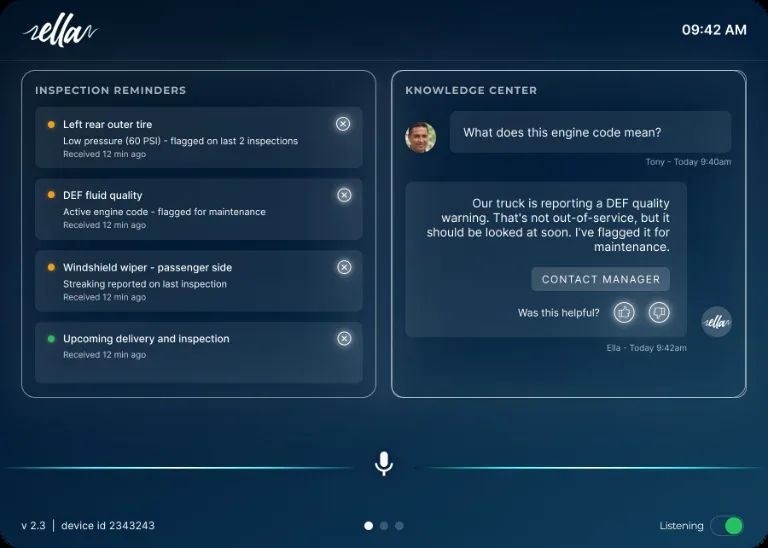
A short briefing on fault codes and recent inspection history before the pre-trip or post-trip. It is advisory: the driver completes and files the DVIR in the TSP driver app.
TriggerIgnition on, Parking Mode or login with no pre-trip DVIR on file. Off-Duty or Sleeper Berth for the post-trip.
Reviews history
Checks the last 5 inspection reports and active fault codes. If everything is clean, she stays silent.
Briefs up to 3 items
Active fault codes first, then recurring defects, then the most recent ones.
Easy to dismiss
“Got it” ends the briefing. No re-prompt for the same trigger within the shift.
-
Self-service support
Practical answers, on demand
Drivers ask about apps, fleet policies and common tasks in plain language. Answers use live trip context (HOS remaining, duty status, location) and documentation from Trucking MDM and the TSP driver app.
TriggerThe driver says “Hey ELLA” and asks a how-to question.
Drive Mode
Voice only, with answers capped at 30 seconds. Longer answers wait for the next stop.
Stopped Mode
Voice and touch, with the full detail on screen.
Hands off when needed
If the answer isn’t in the knowledge base, she offers to connect the driver with dispatch.
-
 Signature feature
Plan the next stop before hours run low
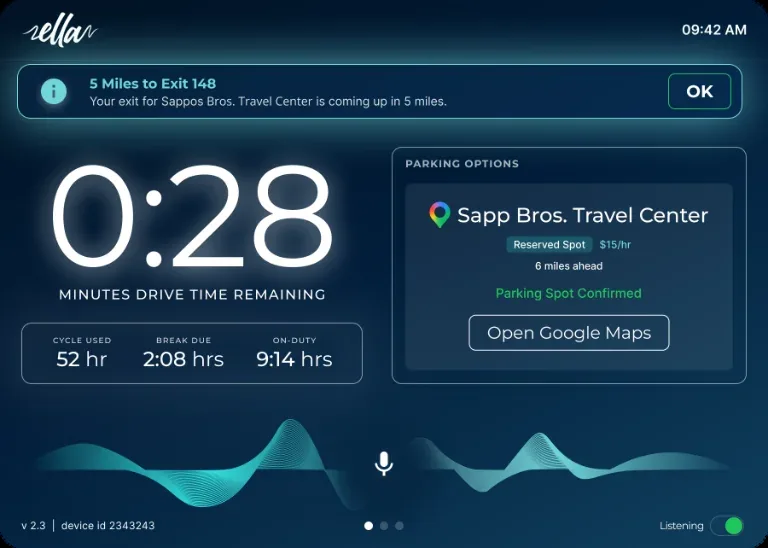
As Hours of Service wind down, E.L.L.A. surfaces free truck parking in real time from the federal TPIMS parking feed, nearest first.
Trigger60, 45, 30 and 15 minutes of HOS remaining, or on demand: “Hey ELLA, what parking spots are near me?”
Watches the clock
A heads-up at 60 minutes, free options at 45, a strong recommendation at 30, and the nearest spot only at 15.
Voices the options
Name, distance and open-spot count for free locations that accept commercial vehicles.
Hands off to navigation
On the driver’s confirmation, Google Maps opens with the chosen spot as the destination.
-
 System reliability
Know what needs attention before departure
Checks the tablet and in-cab systems at the start of the shift, so problems show up in the yard rather than mid-drive. It runs before the inspection briefing.
TriggerThe driver logs in with no pre-trip DVIR on file.
Five checks in parallel
LTE/Wi-Fi, Bluetooth, GPS, app status and the ELD gateway, in under 15 seconds when all pass.
Fixes the gateway
A gateway failure triggers a silent auto-reconnect, then guided steps if needed. It is the only check that blocks the driver.
Resolves conflicts
Offers to disconnect extra Bluetooth devices and runs an audio check. LTE and GPS issues are informational.
Available capabilities depend on your connected systems, data coverage and deployment configuration.
Designed around the driver’s judgment
A co-pilot in a moving truck has to know when to stay quiet. These rules shape how E.L.L.A. talks and acts.
How E.L.L.A. fits a reliable ELD setup-
Short answers while driving
Voice in, voice out. While the truck is moving, answers are capped at 30 seconds. The full detail waits until the driver is safely stopped.
-
Asks before she acts
She confirms with the driver before opening the ELD login screen or starting navigation to a parking option.
-
The driver stays responsible
She briefs on fault codes and inspection history. The driver completes and files the inspection and makes the call.
-
Says when she doesn’t know
When E.L.L.A. does not have a reliable answer, she tells the driver so instead of guessing.
Add E.L.L.A. to any managed FleetTab
/ month
Deployed and managed through Trucking MDM. Training on E.L.L.A. is part of every FleetHub.AI rollout, alongside Device Manager, Remote Support and Fleet Messaging.
What this means for your fleet
- Login reminders
- A voice prompt when the truck moves with no driver logged in.
- Inspection briefings
- Fault codes and recent inspection history before the pre-trip.
- Parking before hours run out
- Nearby options as drive time runs low, where parking data is available.
- On the tablet you already manage
- Runs on the managed FleetTab next to your telematics apps.
Next step
Hear E.L.L.A. in the cab.
Tell us about your trucks, routes and telematics provider. We reply within one business day and can set up a demo for your team.